EAS Station™ Visual Documentation
EAS Station™ documentation
EAS Station™ Visual Documentation
This page provides an index of all professional diagrams and flowcharts available in the EAS Station™ documentation. These visual resources complement the written documentation and help understand system architecture, workflows, and deployment configurations.
📊 Professional SVG Diagrams
System Architecture & Workflows
1. Alert Processing Pipeline
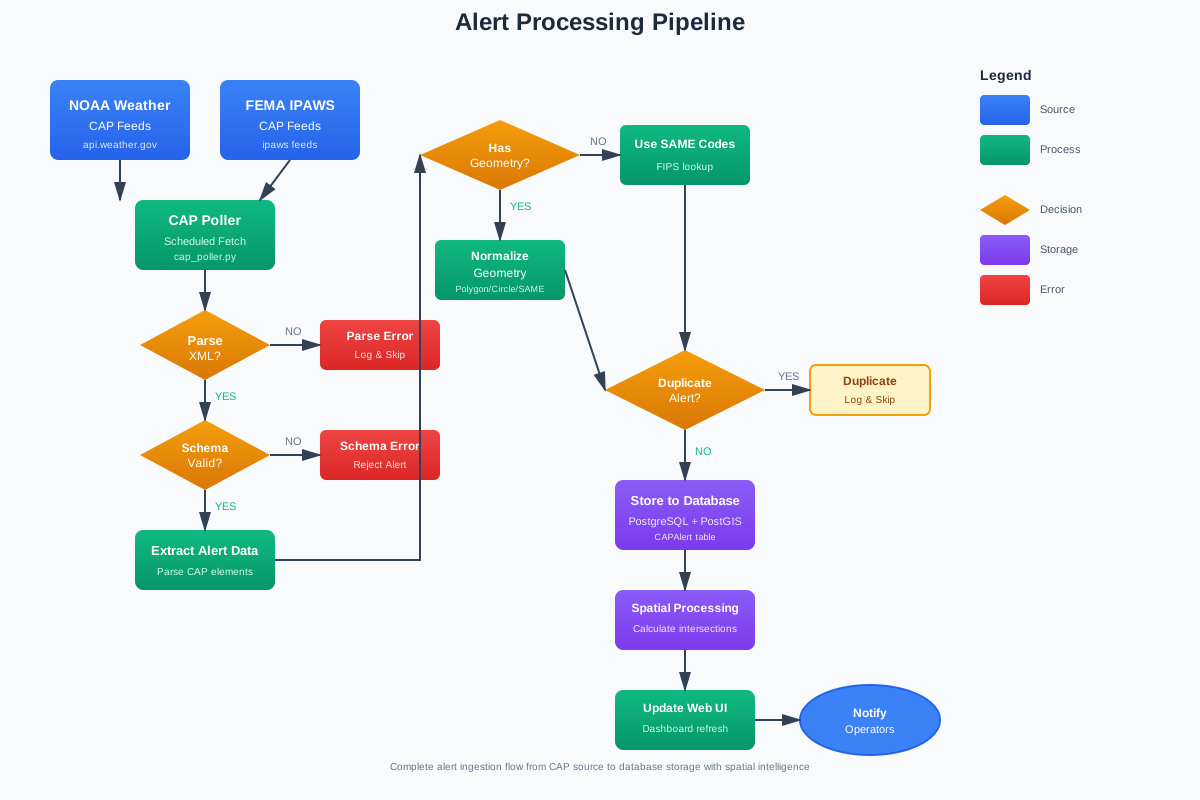
Complete CAP alert ingestion workflow showing data flow from external sources (NOAA/IPAWS) through validation, parsing, spatial processing, duplicate checking, and database storage.
Key Features:
- External CAP feed sources
- XML parsing and schema validation
- Geometry processing (polygon/circle/SAME codes)
- Duplicate detection
- Spatial intelligence with PostGIS
- Database persistence
Use Cases:
- Understanding how alerts enter the system
- Debugging alert ingestion issues
- Planning CAP feed integrations
File: ../assets/diagrams/alert-processing-pipeline.svg
2. EAS Broadcast Workflow
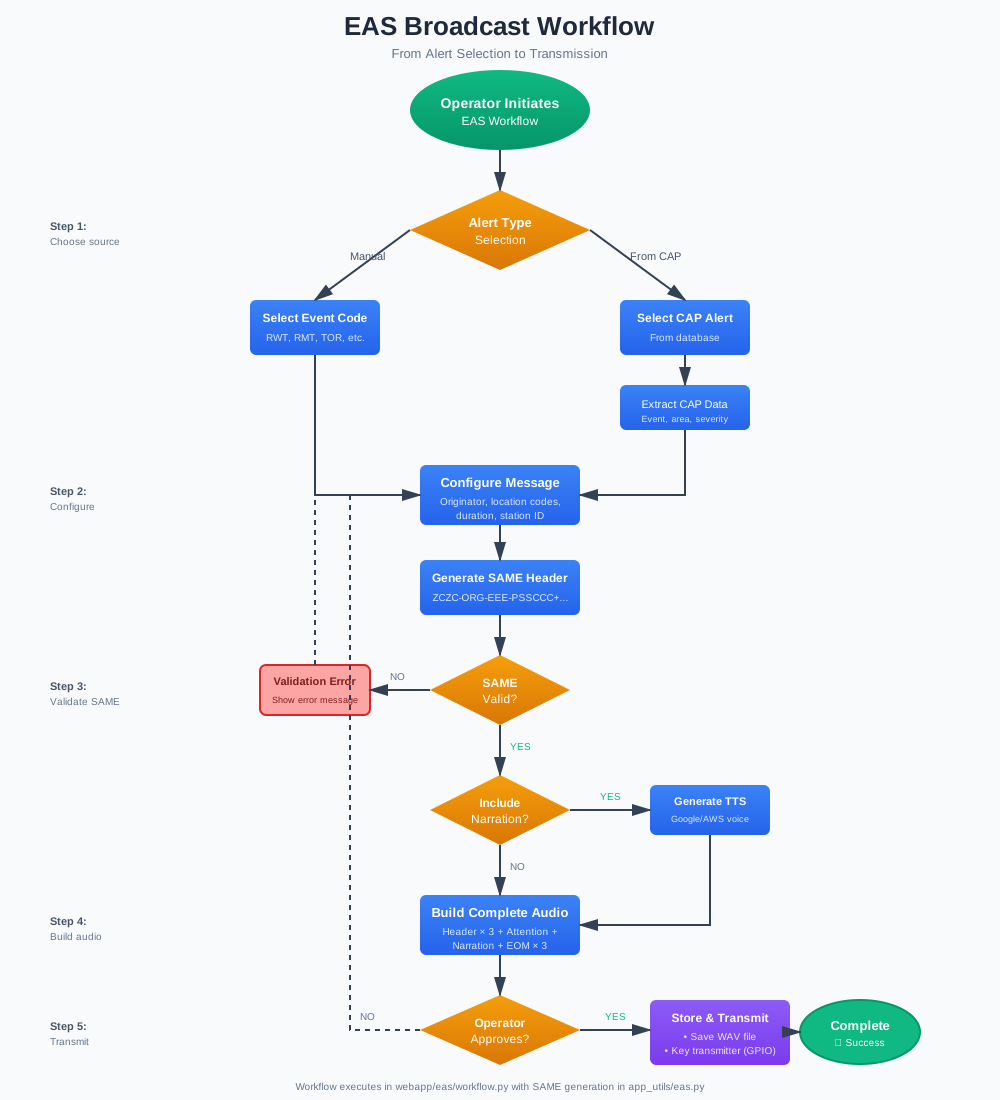
Step-by-step EAS message generation and transmission from operator initiation through SAME encoding, TTS narration, and final broadcast.
Key Features:
- Alert source selection (manual vs. CAP)
- Message configuration
- SAME header generation and validation
- Optional TTS narration
- Complete audio assembly (header × 3, attention signal, narration, EOM × 3)
- Operator approval process
- Transmission via GPIO-controlled transmitter
Use Cases:
- Training new operators
- Understanding broadcast procedures
- Troubleshooting workflow errors
File: ../assets/diagrams/broadcast-workflow.svg
3. SDR Setup & Configuration Flow
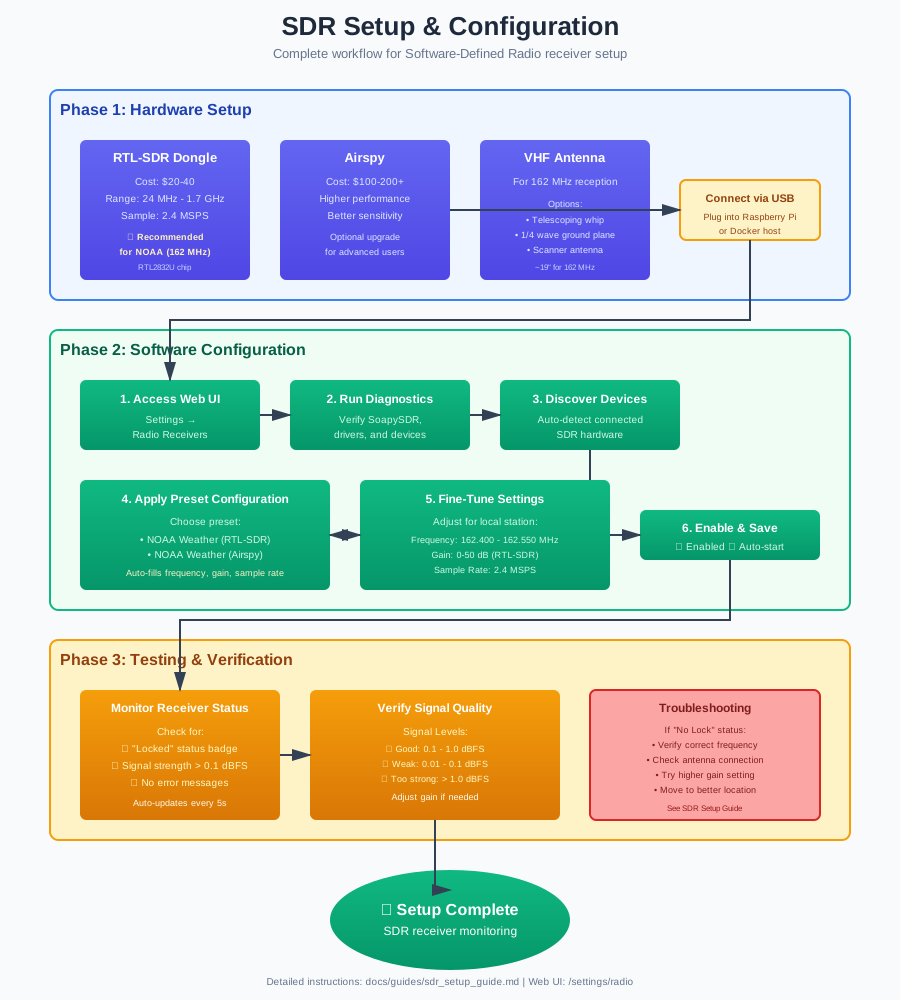
Complete visual guide for setting up Software-Defined Radio receivers including hardware selection, software configuration, and testing procedures.
Key Features:
- Phase 1: Hardware setup (RTL-SDR, Airspy, antennas)
- Phase 2: Software configuration via web UI
- Access settings
- Run diagnostics
- Discover devices
- Apply presets
- Fine-tune parameters
- Phase 3: Testing and verification
- Monitor receiver status
- Verify signal quality
- Troubleshooting guide
Use Cases:
- Initial SDR receiver setup
- Adding new receivers
- Troubleshooting receiver issues
File: ../assets/diagrams/sdr-setup-flow.svg
Related Documentation: SDR Setup Guide
4. Audio Source Routing Architecture
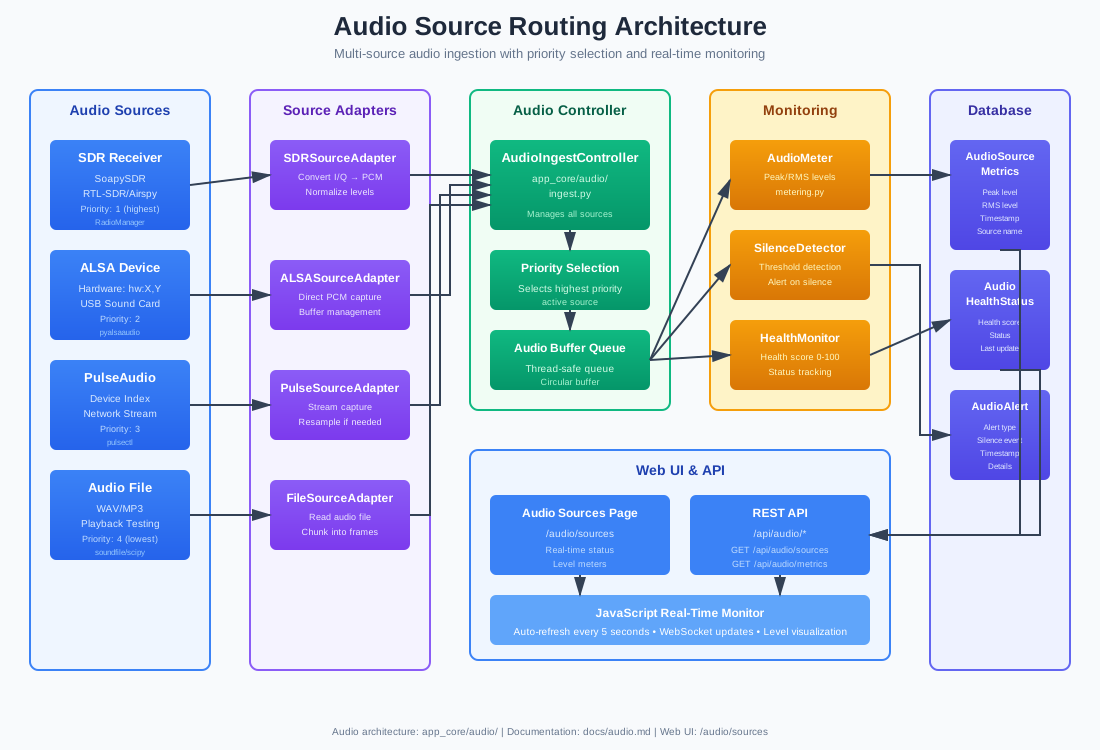
Multi-source audio ingestion system showing how different audio sources are routed through adapters, controllers, and monitoring systems.
Key Features:
- Audio Sources: SDR, ALSA, PulseAudio, File playback
- Source Adapters: Convert various formats to unified PCM
- Audio Controller: Priority selection and buffer management
- Monitoring: Peak/RMS metering, silence detection, health scoring
- Database Integration: Metrics, health status, alerts
- Web UI: Real-time monitoring and API access
Use Cases:
- Understanding audio pipeline architecture
- Configuring audio sources
- Debugging audio issues
- Implementing new source types
File: ../assets/diagrams/audio-source-routing.svg
Related Documentation: Audio Monitoring Dashboard
5. Hardware Deployment Architecture
Physical deployment diagram showing the complete Raspberry Pi 5 reference configuration with all peripherals, storage, and external connections.
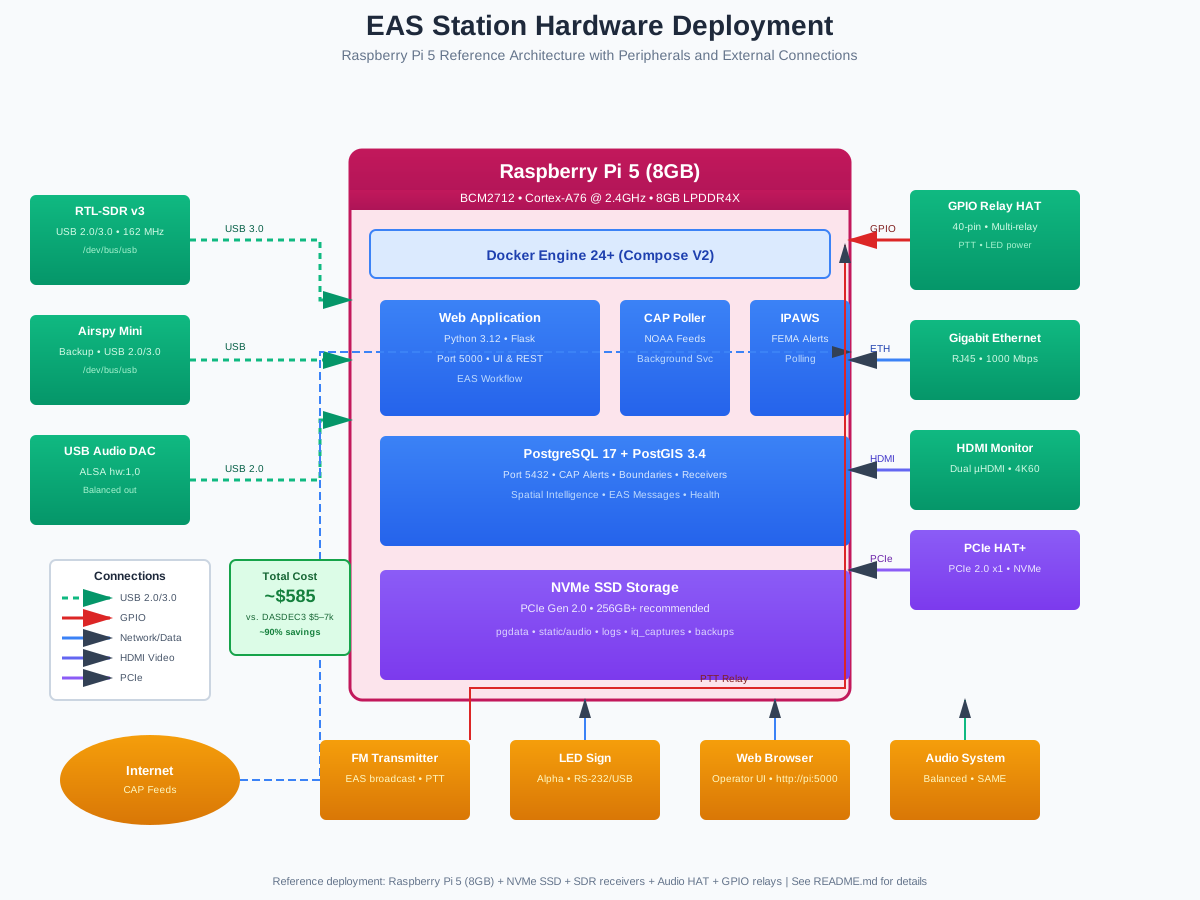
Key Features:
- USB Peripherals: RTL-SDR, Airspy, USB audio DAC
- GPIO Connections: Relay HAT for transmitter control
- Storage: NVMe SSD via PCIe Gen 2
- Network: Gigabit Ethernet
- Display: HDMI monitor support
- External Systems: FM transmitter, LED signs, web browser access
- Cost Analysis: ~$585 vs. $5,000-$7,000 for commercial systems
Use Cases:
- Planning hardware purchases
- Physical installation
- Understanding connections
- Troubleshooting hardware issues
File: ../assets/diagrams/system-deployment-hardware.svg
Related Documentation: README - System Requirements
6. Security & Authentication Architecture
Multi-layer security pipeline from incoming HTTP request through IP filtering, rate limiting, password authentication, MFA (TOTP), session management, role-based access control, and audit logging.
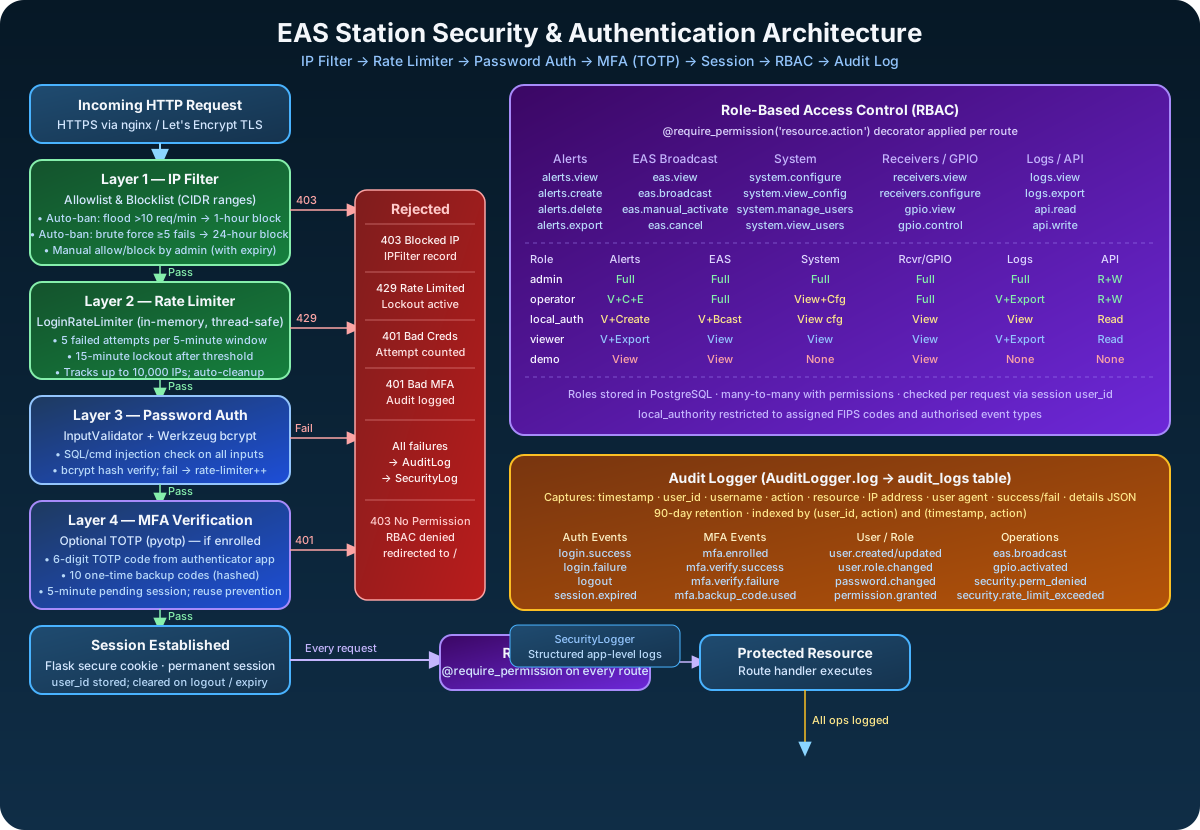
Key Features:
- Layer 1 — IP Filter: Allowlist/blocklist with CIDR support; auto-ban for flood (>10 req/min, 1h) and brute force (≥5 fails, 24h)
- Layer 2 — Rate Limiter: 5 failed attempts per 5-minute window; 15-minute lockout; thread-safe in-memory tracking
- Layer 3 — Password Auth: Werkzeug bcrypt hash verification; failures increment rate-limiter count
- Layer 4 — MFA (TOTP): Optional pyotp 6-digit codes; 10 one-time backup codes; 5-minute pending session timeout; reuse prevention
- RBAC: 5 roles (admin, operator, local_authority, viewer, demo); 22 permissions in resource.action format;
@require_permissiondecorator per route - Audit Logger: Comprehensive event logging to
audit_logstable with IP, user agent, success/fail, 90-day retention
Use Cases:
- Understanding the security model
- Planning user roles and permissions
- Auditing access patterns
- Onboarding new administrators
File: ../assets/diagrams/security-auth-architecture.svg
7. Analytics Pipeline
Time-series analytics pipeline showing data collection from operational sources through aggregation, trend analysis, and anomaly detection into a scheduled background system.
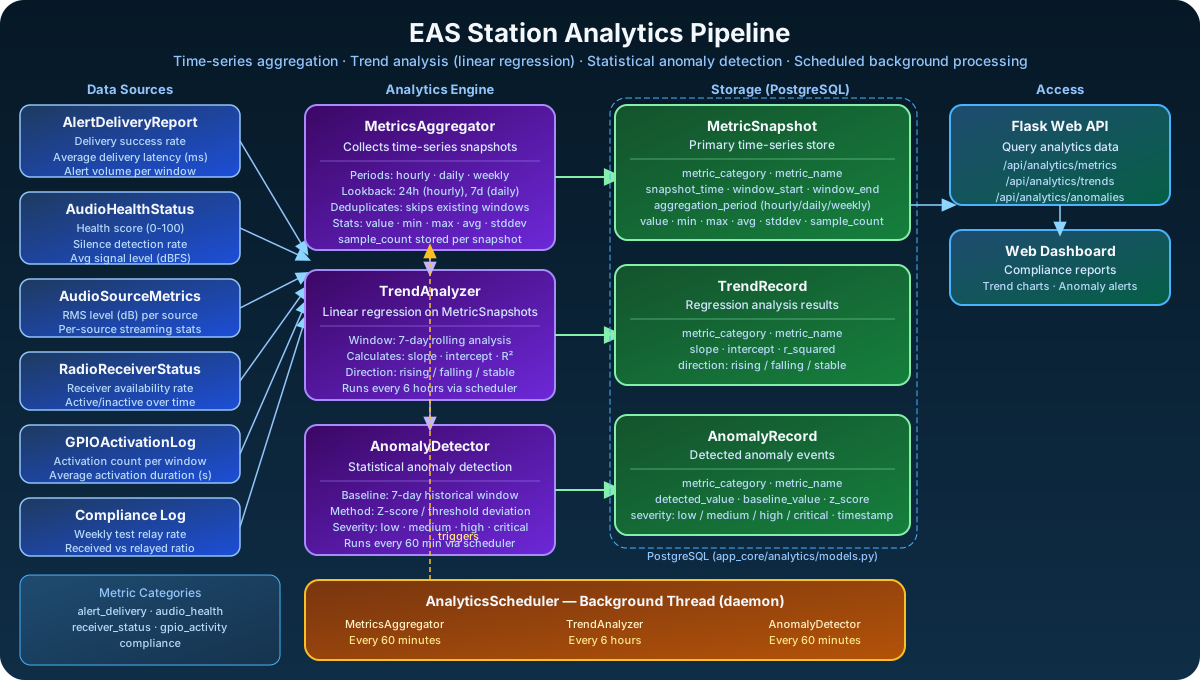
Key Features:
- Data Sources: AlertDeliveryReport, AudioHealthStatus, AudioSourceMetrics, RadioReceiverStatus, GPIOActivationLog, ComplianceLog
- MetricsAggregator: Hourly/daily/weekly snapshots with min/max/avg/stddev; deduplicates existing windows
- TrendAnalyzer: 7-day rolling linear regression; calculates slope, intercept, R²; classifies direction (rising/falling/stable)
- AnomalyDetector: Statistical Z-score detection against 7-day baseline; severity levels (low/medium/high)
- AnalyticsScheduler: Background daemon thread; metrics every 60 min, trends every 6 hours, anomalies every 60 min
- Metric Categories: alert_delivery · audio_health · receiver_status · gpio_activity · compliance
Use Cases:
- Understanding the analytics data model
- Compliance reporting and audit trails
- System health trend monitoring
- Configuring alerting thresholds
File: ../assets/diagrams/analytics-pipeline.svg
🗺️ Legacy Architecture Diagrams (SVG)
These diagrams were created earlier and provide high-level system overviews:
System Architecture Overview
High-level platform architecture showing major components and data flows.
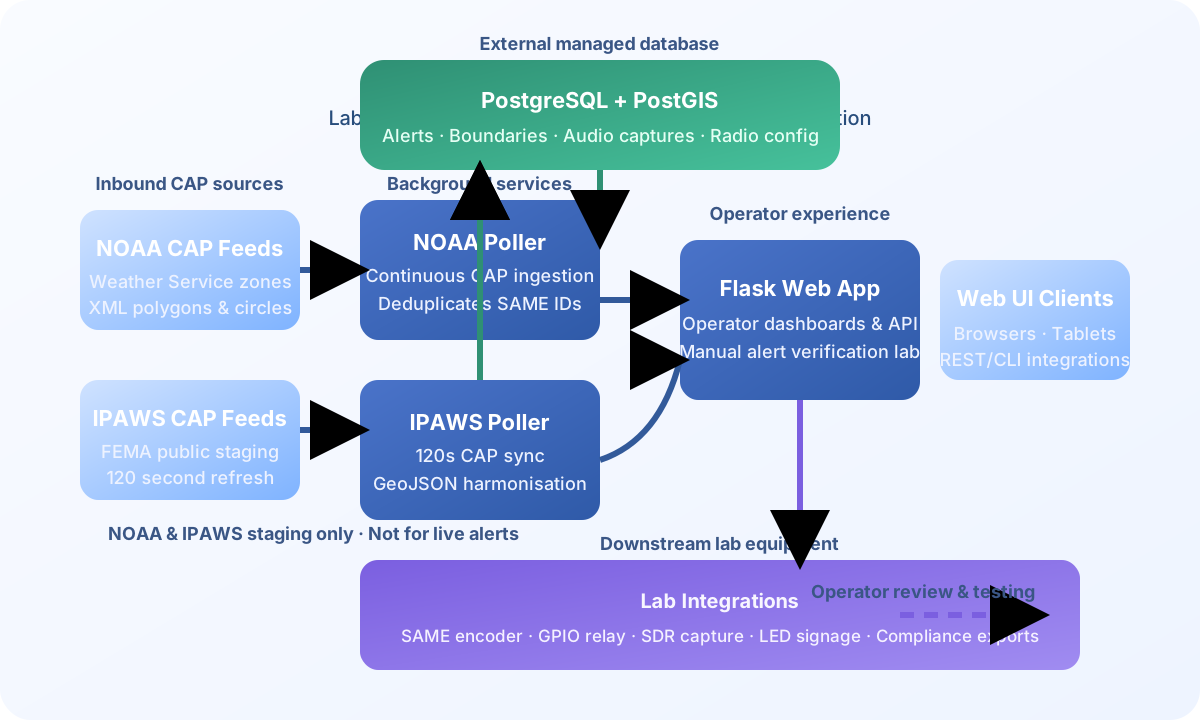
File: ../assets/diagrams/eas-station-architecture.svg
Core Services Overview
Core services diagram showing three main operational areas in a dark theme design.

File: ../assets/diagrams/core-services-overview.svg
📐 Mermaid Diagrams in Documentation
In addition to the professional SVG diagrams above, the following documentation files contain embedded Mermaid.js diagrams that render in GitHub, GitLab, and compatible markdown viewers:
Data Flow Sequences (Mermaid)
File: docs/../architecture/DATA_FLOW_SEQUENCES.md
Contains:
- Alert Processing Data Flow - Complete CAP alert path from fetch to storage
- SDR Continuous Monitoring Data Flow - RF signal to digital samples conversion
- Multi-Source Audio Ingest Data Flow - Audio from multiple sources through adapters
- Radio Capture Coordination Data Flow - Coordinated capture triggering during broadcast
- EAS Message Generation Data Flow - Alert to SAME to audio file generation
- Complete Alert-to-Broadcast Pipeline - End-to-end flow with all components
Rendering:
- ✅ GitHub: Native Mermaid rendering in markdown
- ✅ MkDocs Site: Automatic rendering via pymdownx.superfences
- ✅ Local Viewing: Renders in any Mermaid-compatible markdown viewer
Use Cases:
- Understanding how data moves through the system
- Tracing data transformations at each stage
- Debugging data flow issues
- Onboarding developers to system architecture
- Planning modifications to data processing paths
System Architecture (Mermaid)
File: docs/../architecture/SYSTEM_ARCHITECTURE.md
Contains:
- High-level architecture graph
- Component dependency map
- Alert processing sequence diagram
- Alert ingestion flowchart
- Spatial processing flowchart
- Audio ingest architecture
- Audio source lifecycle state diagram
- Audio metrics sequence diagram
- EAS workflow flowchart
- SAME generation flowchart
- Audio generation pipeline sequence
- SDR capture & verification flowchart
- Verification workflow sequence
- Database entity-relationship diagram
- Data flow diagrams
- Web request flow sequence
- System health monitoring flowchart
- Multi-service coordination diagram
- Deployment architecture diagrams
Theory of Operation (Mermaid)
File: docs/../architecture/THEORY_OF_OPERATION.md
Contains:
- High-level flow diagram
- Conceptual overview of system operation
- Historical context and SAME protocol details
Display System Architecture (Mermaid)
File: docs/../architecture/DISPLAY_SYSTEM_ARCHITECTURE.md
Contains:
- OLED preview system architecture
- Display update cycle sequence diagram
- OLED scrolling performance architecture (main loop, timing precision, seamless loop)
- Visual screen editor component structure
- Editor state management state diagram
- Data binding flow
- Screen rendering pipeline (template to display)
- Variable substitution engine
- Screen rotation and alert preemption workflow
- Alert preemption sequence diagram
- Visual editor to display integration flow
- Frame timing Gantt chart
- Display system future enhancements mindmap
Use Cases:
- Understanding OLED/VFD/LED display management
- Debugging scrolling performance issues
- Contributing to the visual screen editor
- Understanding the screen rotation system
EAS Decoding Architecture (Mermaid)
File: docs/../architecture/EAS_DECODING_SUMMARY.md
Contains:
- Shared
SAMEDemodulatorCorearchitecture showing how both the streaming and file decoders share a single DSP engine - IIR bandpass filter, ENDEC mode detection, and burst timing tracker components
Use Cases:
- Understanding the two-decoder architecture (streaming vs. file)
- Tracing the DSP pipeline from audio input to decoded alert
- Contributing improvements to the shared demodulator core
Ohio EAS Documentation (Mermaid)
File: docs/../reference/OHIO_EAS_DOCUMENTATION.md
Contains:
- Ohio EAS coverage and county hierarchy
- FCC regulatory framework
- National Primary station distribution
- Emergency alert notification type tree
- Alert origination sequence diagram
- State-level authority and routing diagrams
- NWS office coverage
- RWT/RMT test schedule and requirements
- Annual test cycle Gantt chart
- Regional LP-1 relay chains (Central, Northwest, Southwest, Southeast)
- LP-2 relay chain sequence diagram
Use Cases:
- Understanding Ohio-specific EAS plan requirements
- Planning LP-1 and LP-2 monitoring configurations
- Understanding RWT/RMT compliance obligations
SDR Setup Flow (Mermaid)
File: docs/../hardware/SDR_SETUP.md
Contains:
- Three-phase SDR setup flowchart (hardware, software configuration, testing)
Use Cases:
- Guided SDR initial setup
- Adding new receivers
Notification Delivery Flow (Mermaid)
File: docs/../guides/notifications.md
Contains:
- Sequence diagram showing how EAS alerts trigger email (SMTP) and SMS (Twilio) notifications after a broadcast
Use Cases:
- Understanding the post-broadcast notification pipeline
- Troubleshooting email or SMS delivery issues
Alert Geometry and Coverage Calculation (Mermaid)
File: docs/../architecture/ALERT_GEOMETRY_COVERAGE.md
Contains:
- Geometry Resolution Priority Chain — Flowchart showing the three-priority path: (1) raw polygon, (2) previously stored geometry, (3) SAME/FIPS county union
- Alert Type Routing — Table and flowchart mapping NWS product types (High Wind Warning, Tornado Warning, Watch, Advisory, etc.) to the geometry source used for each
- Poll-Cycle Geometry Preservation — Flowchart explaining why SAME-derived geometry is no longer wiped when a polygon-less feed update arrives
- Calculate Coverage Button Flow — Full UI button → API → PostGIS → toast → page-reload flowchart for the "Calculate Affected Boundaries" action
- End-to-End Coverage Calculation Sequence — Sequence diagram tracing a county-wide alert (e.g. High Wind Warning with FIPS codes only) from button click through geometry build, intersection calculation, and final coverage display
Use Cases:
- Understanding why polygon alerts and county-wide alerts follow different paths
- Debugging "Coverage Pending" that reappears after calculation
- Tracing why a SAME-code fallback is intentionally blocked for polygon-based alerts
- Onboarding developers to the spatial coverage subsystem
EAS Test Signal Pipeline (Mermaid)
File: docs/../audio/EAS_TEST_SIGNAL_PIPELINE.md
Contains:
- End-to-end flowchart of the Inject Test Signal feature, from operator button click through FSK generation → SAME decoder → EASBroadcaster → Icecast stream → stream listeners
- Step-by-step table of all 16 pipeline stages with file references
- Explanation of the two separate audio queues (
_eas_broadcastvs_source_broadcast) and why they exist - What the test confirms when it passes (12 verified components)
- Failure mode checklist for when audio is not heard in the stream
Use Cases:
- Understanding what the Inject Test Signal button actually tests
- Diagnosing why audio is not appearing in the Icecast stream after a test
- Onboarding operators who need to verify the full EAS pipeline
- Developers tracing the multi-process, multi-queue audio path
README Architecture (Mermaid)
File: README.md
Contains:
- Simple architecture overview
- Component technology stack
SDR Service Architecture (Mermaid)
File: docs/../architecture/SDR_SERVICE_ARCHITECTURE.md
Contains:
- SDR buffer chain architecture diagram (device → adapter → per-consumer queues)
EAS Monitor V3 Architecture (Mermaid)
File: docs/../architecture/EAS_MONITOR_V3_ARCHITECTURE.md
Contains:
- Previous (V2, multi-monitor) vs. current (V3, unified) SAME decoder architecture
VTEC Event Linking (Mermaid)
File: docs/../reference/VTEC_EVENT_LINKING.md
Contains:
- CAP ingest flow (
cap_poller.py) that extracts and links VTEC identity - Database schema for VTEC-linked alert chains
- Alert-detail page sibling lookup flow
- VTEC action code gating for automatic rebroadcast (
auto_forward.py) - A full multi-alert lifecycle example (issue → update → cancel)
Protocol Reference Diagrams (Mermaid)
Files: docs/../reference/protocols/README.md, MDC1200.md, SAME.md, SAGE_ENDEC.md
Contains:
- On-air pre/post-alert signaling timeline (
README.md) - MDC1200 signaling sequence and encode/decode flow (
MDC1200.md) - SAME/EAS header and burst structure diagrams (
SAME.md) - Sage ENDEC command/status protocol flow (
SAGE_ENDEC.md)
Use Cases:
- Implementing or debugging a pre/post-alert signaling protocol
- Cross-referencing this station's signaling output against the standards it targets
GPIO Relay Wiring (Mermaid)
File: docs/../hardware/GPIO_GUIDE.md
Contains:
- Relay-in-transmit-path wiring diagram (PTT switch replacement/augmentation)
Audit Log Integrity (Mermaid)
File: docs/../security/AUDIT_LOG_INTEGRITY.md
Contains:
- Hash-chain verification flow for the tamper-evident audit ledger
Local Authority EAS Access (Mermaid)
File: docs/../guides/LOCAL_AUTHORITIES.md
Contains:
- Originator-override flow for a delegated local authority's Broadcast Builder alerts
📖 Usage Guidelines
Viewing Diagrams
- On GitHub/GitLab: All diagrams render automatically
- Locally: Open SVG files in any modern web browser
- In Documentation: Embedded images display inline
- Full Size: Click any diagram to view at full resolution
Embedding Diagrams
To embed these diagrams in your own documentation:

Or with a link to full-size view:
[](path/to/diagram.svg)
Diagram Standards
All professional SVG diagrams follow these standards:
- Format: SVG 1.1 with embedded metadata
- Accessibility: Include
<title>and<desc>tags - Resolution: Optimized for both web and print
- Color Scheme: Consistent palette across all diagrams
- Typography: Arial/sans-serif for maximum compatibility
- Icons: Semantic shapes and colors for clarity
Contributing New Diagrams
When adding new diagrams:
- Save as SVG in
docs/../assets/diagrams/directory - Use consistent color scheme and typography
- Include accessibility metadata (title, description)
- Add to this index page
- Reference in relevant documentation
- Update the changelog
🔗 Related Documentation
- System Architecture - Complete technical architecture with Mermaid diagrams
- Theory of Operation - Conceptual overview and operational theory
- Display System Architecture - OLED/VFD/LED display management
- EAS Decoding Summary - Streaming vs. file decoder architecture
- SDR Setup Guide - Radio receiver configuration
- Audio Documentation - Audio system details
- Notifications Guide - Email and SMS notification setup
- README - Project overview and quick start
Last Updated: 2026-09-17 Diagram Count: 9 professional SVG diagrams + 103 embedded Mermaid diagrams across 20 documentation files Total Documentation Coverage: Complete system from hardware to software, including security architecture, analytics pipeline, display system, EAS decoding, notifications, EAS test signal pipeline, alert geometry and coverage calculation, VTEC event linking, protocol references (MDC1200, SAME, Sage ENDEC), GPIO wiring, audit log integrity, local authority delegation, and detailed data processing flows
This document is served from docs/reference/DIAGRAMS.md in the EAS Station™ installation.